Autonomía digital y tecnológica

Código e ideas para una internet distribuida

Linkoteca. GPU


This is a great 100% free Tool I developed after uploading this video, it will allow you to choose an LLM and see which GPUs could run it… : https://aifusion.company/gpu-llm/

Min Hardware requirements (up to 16b q4 models) (eg. Llama3.1 – 8b)
RTX 3060 12GB VRAM : https://amzn.to/3M0HvsL
Intel i5 or AMD Ryzen 5
Intel i5 : https://amzn.to/3WGZtp3
Ryzen 5 : https://amzn.to/46IigoC
36GB RAM
1TB SSD : https://amzn.to/4cBebEd

Recommended Hardware requirements (up to 70b q8 models) (eg. Llama3.1 – 70b)
RTX 4090 24GB VRAM : https://amzn.to/3AjIHow
Intel i9 or AMD Ryzen 9
Intel i9 : https://amzn.to/3YCeLxW
AMD Ryzen 9 : https://amzn.to/3YIaUiT
48GB RAM
2TB SSD : https://amzn.to/3YFQ83A

Professional Hardware requirements (up to 405b and more) (eg. Llama3.1 – 405b)
Stack of A100 GPUs or A6000 GPUs
https://amzn.to/3yojZ5T
Enterprise grade CPUs
https://amzn.to/3YDgByw
https://amzn.to/4dEbfY2
Are NVIDIA GeForce Graphics Cards Compatible with AMD CPUs?

The simple answer is: yes! AMD CPUs are designed to work with any graphics cards, and any modern NVIDIA GeForce GPU will work fine with an AMD CPU. GPU and CPU brands are characteristically inter-compatible.

Where some PC components become incompatible with each other is when the sockets and connectors don’t match up. This is extremely common with CPUs and motherboards, as certain processors only work with sockets and chipsets designed for that CPU.

Modern graphics cards use the PCI Express expansion bus standard, and as long as your motherboard has the right slot for your graphics card you’re good to go. PCIe is a universal standard and therefore you’ll find motherboards for both AMD and Intel CPUs with the right connector for your graphics card.

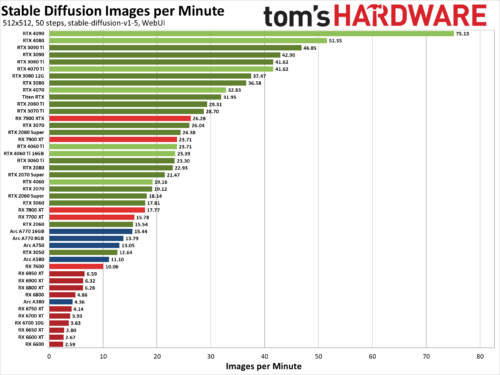
Stable Diffusion images per minute. Benchmarking 50 GPUs

We’ve benchmarked Stable Diffusion, a popular AI image generator, on the 45 of the latest Nvidia, AMD, and Intel GPUs to see how they stack up. We’ve been poking at Stable Diffusion for over a year now, and while earlier iterations were more difficult to get running — never mind running well — things have improved substantially. Not all AI projects have received the same level of effort as Stable Diffusion, but this should at least provide a fairly insightful look at what the various GPU architectures can manage with AI workloads given proper tuning and effort.

The easiest way to get Stable Diffusion running is via the Automatic1111 webui project. Except, that’s not the full story. Getting things to run on Nvidia GPUs is as simple as downloading, extracting, and running the contents of a single Zip file. But there are still additional steps required to extract improved performance, using the latest TensorRT extensions. Instructions are at that link, and we’ve previous tested Stable Diffusion TensorRT performance against the base model without tuning if you want to see how things have improved over time. Now we’re adding results from all the RTX GPUs, from the RTX 2060 all the way up to the RTX 4090, using the TensorRT optimizations.

For AMD and Intel GPUs, there are forks of the A1111 webui available that focus on DirectML and OpenVINO, respectively. We used these webui OpenVINO instructions to get Arc GPUs running, and these webui DirectML instructions for AMD GPUs. Our understanding, incidentally, is that all three companies have worked with the community in order to tune and improve performance and features.